

Images are the backbone of engaging websites, but they can also be your site’s biggest performance bottleneck. For small and medium-sized businesses
If you’re making decisions about your website and your marketing without reliable data, you’re guessing. Google provides a powerful suite of free tracking tools that can tell you exactly how your website is performing – who’s visiting, how they found you, what they’re doing, and where you’re losing them to competitors.
The challenge is that setting these tools up correctly, connecting them to each other, and interpreting what you’re looking at requires knowledge most business owners simply haven’t had reason to develop. A poorly configured GA4 setup can give you data that feels reassuring but actively misleads you.
I’m Cheryl Logan Baird, an independent SEO consultant based in Johannesburg, working with small and medium-sized businesses.
I set up, configure, and connect Google’s tracking tools properly.
Your website is almost certainly your most important marketing asset. Unlike a brochure or a social media post, it works for your business 24 hours a day – or it should be.
Without tracking in place, you have no way to know:
• Which pages are attracting visitors and which are being ignored entirely
• Where your traffic is actually coming from – Google search, direct visits, social media, referrals
• Which specific search queries are bringing people to your site
• How visitors behave once they arrive – what they click, how long they stay, where they leave
• Whether visitors are completing the actions that matter – form submissions, phone calls, purchases
• Which of your marketing activities is actually generating results, and which is wasting budget
With this data, every marketing decision becomes informed. Without it, every decision is a guess – including whether your current SEO work is having any effect at all.
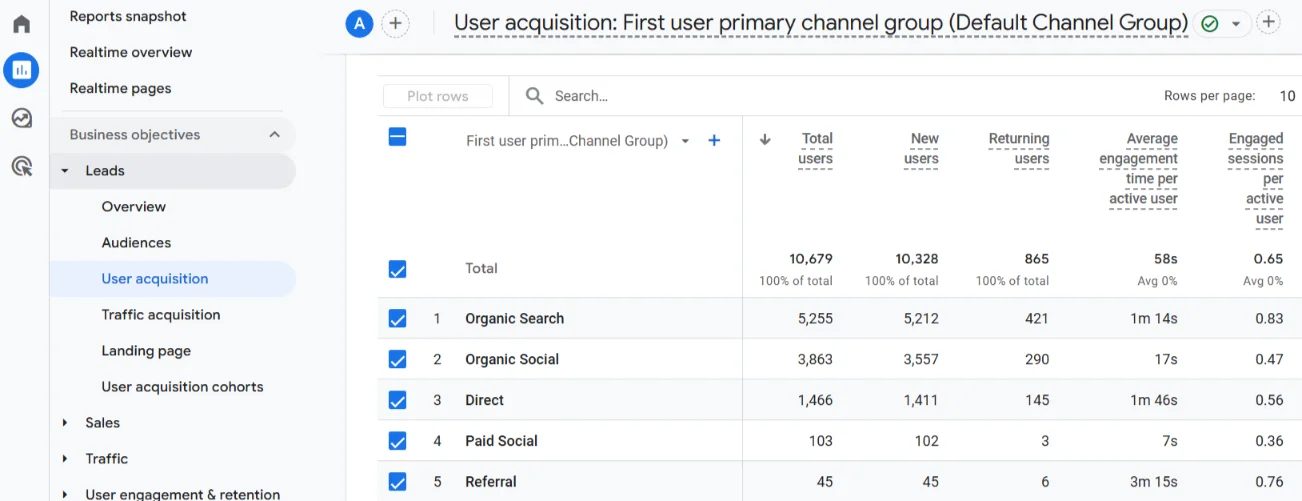
Google Analytics 4 is Google’s current free website analytics platform. It tracks user behaviour across your site, providing data on sessions, users, page views, traffic sources, device types, geographic locations, as well as conversion events specific to your business goals.
GA4 is a fundamental departure from the older Universal Analytics platform. Its event-based data model is more flexible and more powerful, but it also means that correct configuration requires deliberate setup. A default GA4 installation misses most of the insights that make it genuinely useful.

Google Search Console is arguably the most important free SEO tool available. Where GA4 focuses on what visitors do on your site, Search Console shows you how Google sees your website – including which queries trigger your pages in search results, which pages are indexed, and whether Google has flagged any technical issues.
For any business doing SEO, Search Console is essential data. It tells you exactly which keywords your site is ranking for, which pages are earning clicks, what your average positions are, and where there are opportunities to improve. It’s also where you’ll see Google’s Core Web Vitals assessment of your site and any manual penalties.
Key data available in Search Console:
I set up Google Search Console, verify ownership, submit your XML sitemap, and walk you through the most important reports so you can interpret the data independently.
Raw data from GA4 and Search Console is powerful but not always easy to read at a glance. Data Studio is a free tool that connects to multiple data sources and turns them into clean, automatically-updating visual dashboards.
A well-built Data Studio dashboard gives you a single view of your website’s performance – organic traffic trends, top-performing pages, conversion rates, keyword rankings, and more – without needing to log into multiple platforms and remember where to find what you need.
A good dashboard should answer your three most important questions about your website performance within 30 seconds of opening it.
Google Tag Manager (GTM) is a free tool that allows tracking codes, conversion tags and event triggers to be added and managed without editing your website’s code directly. It’s the professional standard for deploying GA4 and other tracking on WordPress sites, but it’s not always necessary.
For smaller websites with straightforward tracking needs, GTM adds unnecessary complexity. In these cases, GA4 and Google Search Console can be connected directly and cleanly, without the overhead of an additional layer to maintain.
Where GTM earns its place is on sites with more complex or evolving tracking requirements. Without it, every new tracking change means a code edit – with the associated risk of errors, delays, and developer involvement. With GTM set up, adding or modifying tracking becomes a clean, auditable, low-risk process that scales as your needs grow.
I assess each site individually and recommend the approach that fits – whether that’s a direct GA4 and/or Google Search Console implementation or GTM as the foundation for a more sophisticated tracking setup.
To work with Google’s tracking tools, you’ll need a Google account. If you use Google Workspace for business email, that works perfectly. If not, you’ll need to create a dedicated Gmail account for your business – separate from your personal Gmail – and using it as the central account for all your Google business tools.
Once that’s in place, I handle all the technical setup: creating properties, deploying tracking codes via GTM, connecting data sources, and configuring Data Studio. You don’t need any technical knowledge to get started – just access to your WordPress website.
Yes, they serve completely different purposes. GA4 tells you what users do on your site: where they came from, what they viewed, and whether they converted. Search Console tells you how Google sees your site: which searches lead to it, which pages are indexed, and what technical issues exist. Together they give you the complete picture. Used separately, each has significant blind spots.
Almost certainly not. Universal Analytics (the previous version of Google Analytics) was shut down in July 2024. If your tracking hasn’t been updated to GA4, you have no current data.
I verify every implementation in real time before the project is complete. You’ll see live activity in GA4 confirming data is being received, and I’ll test each conversion event individually to confirm it’s firing under the right conditions. Nothing gets signed off until the data is confirmed accurate.
Yes, I consider it an essential part of the service. A tracking setup you don’t understand has limited value. Every project includes a practical walkthrough of the key reports relevant to your goals, along with a reference guide you can return to. The aim is that you finish the engagement genuinely able to monitor your own performance.
Yes. Data Studio is a free Google product. You’ll need a Google account to access it, but there’s no subscription cost. The dashboards I build for you update automatically by pulling live data from your connected GA4 and Search Console accounts.
The latest SEO and WordPress News and Resources
Images are the backbone of engaging websites, but they can also be your site’s biggest performance bottleneck. For small and medium-sized businesses

Keeping your WordPress website maintained isn’t just about avoiding downtime, it’s about ensuring security, optimal performance, a superior user experience, and long-term

Your website’s loading speed can make or break your business. Studies show most visitors leave if a site takes more than 3