

Every day, potential customers search online for businesses like yours. Yet if you’re like 64% of small business owners, you’re struggling to show up in local search results. The cause? Often, it’s not that your competitors are better, they’re just avoiding common SEO mistakes that can keep your site buried.
Search Engine Optimisation (SEO) is simply the practice of making your website more attractive to search engines like Google, so they show your business to people searching for your products or services. For smaller businesses, effective SEO can be the difference between thriving and merely surviving in today’s digital marketplace.
With 97% of consumers searching online for local businesses and 76% of people who conduct a local search visiting a business within 24 hours, the stakes have never been higher. The good news? Most SEO mistakes are completely fixable, and you don’t need a computer science degree or a massive budget to fix them.
In this guide, I’ll walk through the seven most costly SEO mistakes small businesses make and provide you with practical, step-by-step solutions you can implement starting today. By the end, you’ll have a clear action plan to improve your online visibility and attract more customers.
Mistake #1: Ignoring Local SEO Completely
The Problem
Local SEO is the practice of optimising your online presence to attract customers from your local area. Think of it as putting up a digital billboard that only appears when people nearby search for what you offer. When someone types “pizza near me” or “dentist in [your city],” local SEO determines whether your business appears in those important results.
Yet surprisingly, 56% of local businesses haven’t even claimed their Google Business Profile, essentially leaving money on the table every single day. Consider this: 46% of all Google searches are looking for local information, and businesses that appear in the top three local search results receive 44% of all clicks.
This isn’t just about being found online. Local searches have incredibly high commercial intent, meaning people are ready to buy, visit, or call. When someone searches “emergency plumber near me” at 11 PM, they’re not browsing, they’re looking to hire someone immediately.
Common Signs You’re Making This Mistake
You’re likely neglecting local SEO if your business information appears differently across various websites and directories. For example, your address might be “123 Main Street” on your website but “123 Main St.” on your Facebook page and “123 Main Street, Suite A” on a directory. Search engines get confused by these inconsistencies and may not show your business when local customers are searching.
Another red flag is having no Google Business Profile at all, or having one that’s unverified and barely filled out. If potential customers can’t find your hours, phone number, or location easily when they search for your business name, you’re losing sales to competitors who make this information readily available.
Many small businesses also create generic content that could apply to any location. If your website never mentions your city, neighbourhood, or local landmarks, search engines have no way to connect you with local searchers.
The Fix
Start by claiming and optimising your Google Business Profile. This free tool is your most important local SEO asset. Log into Google Business Profile, claim your listing, and verify your business . The process is relatively simple but can take some time.

Once verified, fill out every section completely. Add high-quality photos of your storefront, products, team, and interior. Upload new photos monthly – Google rewards active profiles with better visibility. Write a compelling business description that naturally includes your location and services.
Most importantly, maintain NAP consistency (Name, Address, Phone number) across every online platform where your business appears. Create a master document with your exact business information and use it identically everywhere – your website, social media profiles, directory listings, and any online mentions.
Encourage satisfied customers to leave Google reviews and respond to all reviews professionally. Businesses with more recent, positive reviews rank higher in local search results and attract more customers.
Create location-specific content on your website. If you’re a contractor serving multiple cities, create separate pages for each service area. Title them “Plumbing Services in [City Name]” and include local information like landmarks, neighbourhood names, and area-specific services you provide.
Quick Win
Right now, search for your business name on Google and check if your Google Business Profile appears with accurate information. If it doesn’t exist or looks incomplete, spend the next 30 minutes claiming and filling out your profile. This single action can improve your local visibility within days.
Mistake #2: Keyword Stuffing and Poor Keyword Strategy
The Problem
Keyword stuffing is the practice of cramming as many keywords as possible into your content, often making it read unnaturally. Many small business owners think more keywords equal better rankings, so they write sentences like: “Our Denver plumbing company provides Denver plumbing services for all Denver residents needing plumbing in Denver.”
This approach backfires spectacularly. Modern search engines are sophisticated enough to recognise when content is written for robots instead of humans. Google’s algorithm prioritises content that provides genuine value to users, not content that simply repeats keywords.
Additionally, many small businesses target only broad, highly competitive keywords like “restaurant” or “lawyer” instead of focusing on specific phrases their customers actually use. A local pizza shop trying to rank for “pizza” nationally is competing against Pizza Hut and Domino’s for example – a battle they’ll never win.
The most successful small businesses understand that customers search differently depending on where they are in the buying process. Someone searching “what is digital marketing” has different needs than someone searching “digital marketing agency in [city name] reviews.”
Common Signs You’re Making This Mistake
Your content sounds robotic or repetitive when read aloud. If you find yourself using the same phrase multiple times in a single paragraph, you’re likely keyword stuffing. Another warning sign is targeting only broad, one-word keywords instead of longer, more specific phrases.
You might also be making this mistake if you’re not considering search intent – the reason behind someone’s search. Are they looking for information, trying to find a specific website, or ready to make a purchase? Content that ignores search intent rarely ranks well, even with perfect keyword usage.
Many small businesses also ignore long-tail keywords (longer, more specific search phrases) entirely. While “lawyer” gets millions of searches, “family law attorney in [city name]” gets fewer searches but much higher conversion rates because it targets exactly what someone needs.
The Fix
Start with proper keyword research using free tools like Google’s Keyword Planner, Mangools or AlsoAsked (3 free daily credits) instead of guessing what people search for. To discover what they actually type into Google, you can also use the Google “Alphabet Soup” method, which takes time but worth it.
Focus on long-tail keywords that match your business and location. A bakery shouldn’t just target “cake”, they should target “custom wedding cakes [city name]” or “birthday cake delivery near me.” These phrases have less competition and higher conversion rates.
Apply the 80/20 rule to keyword selection: spend 80% of your effort on long-tail keywords you can realistically rank for, and 20% on broader terms for future growth. A new accounting firm should target “tax preparation [city name]” before attempting to rank for “accounting.”
When writing content, focus on natural language first, then optimise. Write each page or blog post to answer a specific question your customers ask. Include your target keyword naturally in the title, first paragraph, and a few times throughout the content, but only where it makes sense.
Create topic clusters around your main services. If you’re a fitness trainer, create comprehensive content around “weight loss,” “strength training,” and “nutrition coaching,” with multiple pages supporting each main topic.
Mistake #3: Neglecting Website Speed and Mobile Experience
The Problem
Website speed isn’t just about user convenience, it’s a direct ranking factor Google uses to determine search results. A website that takes longer than three seconds to load loses its visitors before they even see your content. For small businesses, every lost visitor is a potential customer choosing a competitor instead.
Mobile experience is equally critical because Google uses mobile-first indexing, meaning they primarily use your website’s mobile version to determine rankings for both mobile and desktop searches. With over 60% of searches now happening on mobile devices, a poor mobile experience doesn’t just frustrate users, it actively hurts your search rankings.
Many small business websites suffer from oversized images, excessive plugins, low-quality hosting, and designs that weren’t built with mobile users in mind. The result is a slow, clunky experience that sends customers straight to better-optimised competitors.
Consider the customer journey: someone searches for your service on their phone, finds your website, but can’t easily read your text, tap your phone number, or navigate your menu. They immediately hit the back button and try the next result. Google notices this behaviour and assumes your website doesn’t provide a good user experience, lowering your rankings accordingly.
Common Signs You’re Making This Mistake
Test your website loading speed using Google PageSpeed Insights. Check both the mobile and desktop scores, and if either of your Performance scores is below 50, you have serious speed issues that are affecting both user experience and search rankings. As I said above, the most common culprits include images that haven’t been compressed, too many plugins, and low-quality hosting.

For mobile experience, visit your website on your phone and try to complete basic tasks. Can you easily read the text without zooming? Are buttons large enough to tap with your finger? Can you find your phone number and address quickly? If you struggle with these tasks, your customers do too.
Other warning signs include high bounce rates (people leaving immediately) in your Google Analytics, and feedback from customers saying they couldn’t find your information or had trouble using your website.
The Fix
Start with a speed audit using Google PageSpeed Insights. This free tool identifies specific issues slowing down your website and provides recommendations for improvement. Focus on the suggestions marked “Diagnostics” or “Insights” first.
Optimise your images by compressing them before uploading to your website. Large, uncompressed photos are often the biggest speed killers. There are many free online tools to do this, try the free Squoosh App which is recommended by Google.
Consider upgrading your hosting if you’re using the cheapest shared hosting available. Reliable hosting is one of the best investments a small business can make for website performance.
For mobile optimisation, ensure your website uses responsive design that automatically adjusts to different screen sizes. Test your website on various devices.
Make critical information easily accessible on mobile. Your phone number should be clickable if you want users to call you, your address should link to directions if customers are visiting you, and your main navigation should be simple and touch-friendly.
Quick Win
Run your website through Google PageSpeed Insights right now and implement the first “insight” recommendation it provides. Often, this involves compressing a few large images, and see immediate speed improvements.
Mistake #4: Missing or Poorly Written Meta Descriptions and Title Tags
The Problem
Title tags and meta descriptions are the first impression your business makes in search results. The title tag appears as the blue, clickable headline, while the meta description is the short summary underneath. Together, they function as your digital storefront window – they determine whether someone clicks on your result or chooses a competitor.
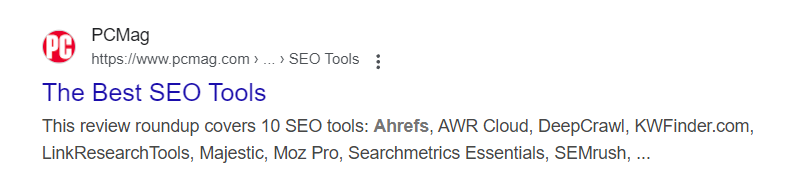
Many small businesses either ignore these completely, letting search engines create generic versions, or write them poorly without understanding their purpose. A title tag that simply says “Home” or “About Us” tells potential customers nothing about what you offer or why they should choose you.
Poor meta descriptions are equally damaging. Generic descriptions like “Welcome to our website” or “We provide quality service” don’t give users any compelling reason to click. Meanwhile, competitors with specific, benefit-focused descriptions attract more clicks and consequently rank higher over time.
Search engines use click-through rates as a ranking signal. If your search result gets fewer clicks than competitors, Google assumes your content is less relevant and may lower your rankings. This creates a downward spiral where poor titles and descriptions lead to fewer clicks, which leads to lower rankings, which leads to even fewer clicks.
Common Signs You’re Making This Mistake
Search for your main business keywords and examine your results. If your title tags are generic, duplicate across multiple pages, or don’t include your target keywords naturally, you’re missing opportunities for more clicks and better rankings.
Your meta descriptions might be problematic if they’re missing entirely, cut off mid-sentence in search results, or don’t clearly communicate what makes your business different. Google typically displays about 155 characters of meta descriptions, so anything longer gets truncated.
Another red flag is having the same title tag or meta description across multiple pages of your website. Each page should have unique, descriptive titles and descriptions that accurately reflect that page’s content.
The Fix
Write unique, descriptive title tags for every page on your website. Include your target keyword naturally, your location if relevant, and a clear benefit. For example, instead of “Services,” use “Professional Carpet Cleaning Services in Denver | Same-Day Service Available.”
Keep title tags under 60 characters to prevent them from being cut off in search results. Front-load the most important information, if space is limited, searchers should still understand what you offer.
Craft compelling meta descriptions that act as mini-advertisements for each page. Include your target keyword, a clear benefit, and a soft call-to-action when appropriate. For example: “Get professional carpet cleaning in Denver with same-day service. Our eco-friendly process removes tough stains and odors. Free estimates available—call today!”
Use action words and benefits in your meta descriptions. Instead of “We clean carpets,” try “Remove tough stains and odours with our professional carpet cleaning service.” Focus on what the customer gets, not what you do.
Include local information in title tags and meta descriptions when relevant. “Best Pizza in Downtown Denver” is more compelling and specific than “Best Pizza Restaurant.”
For service businesses, consider including specific services in title tags: “Plumbing Repair, Installation & Emergency Service | Denver Plumbers” tells searchers exactly what you offer.
Quick Win
Choose your five most important pages and rewrite their title tags and meta descriptions using the guidelines above. Focus on your homepage, main service pages, and contact page first. You can usually see improvements in click-through rates within a few weeks.
Mistake #5: Creating Content Without Purpose or Strategy
The Problem
Many small businesses approach content creation like throwing spaghetti at a wall – they publish random blog posts, hoping something will stick and improve their search rankings. This approach wastes time and resources while failing to achieve meaningful SEO results.
Content without purpose doesn’t serve your business goals or your customers’ needs. Publishing weekly blog posts about random industry topics might feel productive, but if those posts don’t target keywords your customers search for or address their specific problems, they won’t drive traffic or generate leads.
The most successful small businesses create content with clear purposes: to rank for specific keywords, to answer common customer questions, to demonstrate expertise, or to guide potential customers through the buying process. Each piece of content should have a defined goal and target audience.
Google’s E-E-A-T algorithm (Experience, Expertise, Authoritativeness, Trustworthiness) increasingly favours content created by recognised experts in their field. Small businesses that demonstrate deep knowledge of their industry and local market often outrank larger competitors who publish generic content
Common Signs You’re Making This Mistake
Your blog posts receive little traffic and generate few leads or inquiries. You might be publishing content regularly but seeing no improvement in search rankings or website visitors. This often happens when content doesn’t target keywords people actually search for.
Another warning sign is creating content that doesn’t relate clearly to your products or services. If you’re an accountant writing about cooking tips, you might attract visitors, but they’re unlikely to become clients.
You may also be making this mistake if you publish inconsistently or abandon content creation during busy periods. Search engines favour websites that regularly publish fresh, relevant content.
The Fix
Start with a content audit of your existing blog posts or articles. Use Google Analytics and Google Search Console to identify which pieces generate the most traffic and leads. Look for patterns – what topics, formats, or approaches work best for your audience?
Develop buyer personas for your ideal customers and create content that addresses their questions at each stage of the buying process. Someone researching “how to choose an accountant” has different needs than someone searching “tax preparation near me.”
Use keyword research to identify content opportunities. Tools like Answer the Public show you actual questions people ask about your industry. Create comprehensive content answering these questions better than your competitors.
Plan content around service pages and local topics. If you’re a landscaping company, create detailed guides about lawn care specific to your local climate and soil conditions. This type of hyper-local content often ranks well and attracts qualified local prospects.
Establish a realistic publishing schedule and stick to it. Google prefers websites that regularly publish fresh content, but quality matters more than quantity. One well-researched, comprehensive article per month is better than four superficial posts.
Repurpose successful content across multiple formats. Turn a popular blog post into a video, infographic, or podcast episode. This maximises the value of your content creation efforts and reaches customers who prefer different content types.
Document your expertise through case studies, behind-the-scenes content, and detailed explanations of your processes. This type of content builds authority and trust while providing unique value competitors can’t easily replicate.
Quick Win
Identify the three most common questions customers ask you during sales calls or consultations. Create one piece of comprehensive content answering each question in detail. Target long-tail keywords related to these questions and publish one piece this month.
Mistake #6: Ignoring Technical SEO Basics
The Problem
Technical SEO refers to the behind-the-scenes elements that help search engines crawl, understand, and index your website effectively. While it sounds complicated, most technical SEO issues facing small businesses are relatively simple to fix and can significantly impact search rankings.
When technical problems exist, search engines struggle to access or understand your content, regardless of how valuable it might be. It’s like having an amazing store but locking the front door – customers can’t benefit from what you offer if they can’t get inside.
Common technical issues include broken links that lead nowhere, missing or duplicate title tags, slow loading speeds, and websites that aren’t secure (don’t use HTTPS). These problems create poor user experiences and signal to search engines that your website isn’t well-maintained or trustworthy.
Many small business websites also lack XML sitemaps, which are like roadmaps that help search engines understand your website structure and find all your important pages. Without a sitemap, search engines might miss valuable content entirely.
Common Signs You’re Making This Mistake
You can identify technical SEO issues by using free tools like Google Search Console, which shows you errors Google encounters when crawling your website. Common problems include crawl errors, indexing issues, and security problems.
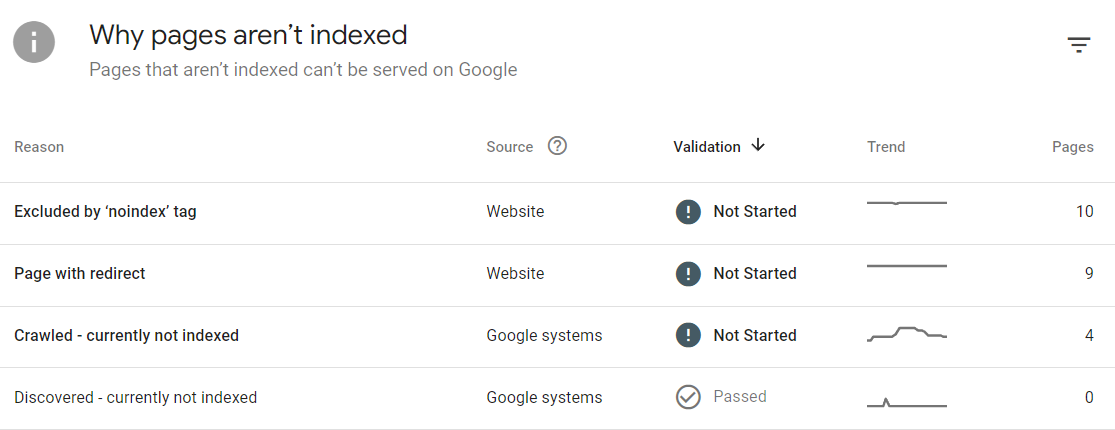
If your website has broken links, error pages, or sections that don’t work properly, these technical problems hurt both user experience and search rankings. Users who encounter broken links often leave immediately, creating negative signals that affect your rankings.
Another red flag is not having Google Search Console and Google Analytics set up at all. These free tools provide essential insights into how your website performs in search results and help identify technical problems before they seriously impact your rankings.
The Fix
Set up Google Search Console if you haven’t already. This free tool identifies technical issues, shows which keywords drive traffic to your website, and provides insights directly from Google about your website’s performance.
Run a basic technical audit using tools like Screaming Frog (free for up to 500 pages). These tools identify broken links, missing meta descriptions, duplicate content, and other technical issues.
Ensure your website uses HTTPS (secure protocol) rather than HTTP. Most hosting providers offer free SSL certificates, and Google considers HTTPS a ranking factor while browsers warn users about unsecured websites.
Create and submit an XML sitemap to Google Search Console. Most modern websites automatically generate sitemaps, but you need to submit yours to help Google discover and index your pages more effectively.
Fix broken links by either updating them to point to correct pages or removing them entirely. Broken links create poor user experiences and waste the “link juice” that helps pages rank in search results.
Address duplicate content issues by ensuring each page on your website has unique, valuable content. If you have multiple pages covering similar topics, consider combining them into one comprehensive resource.
Optimise your website’s URL structure to be descriptive and user-friendly. URLs like “yoursite.com/plumbing-services-denver” are better than “yoursite.com/page123” for both users and search engines.
Quick Win
Set up Google Search Console for your website right now. You’ll need to add some code to the backend of your site to connect Search and your website, then submit your sitemap. Within a few days, you’ll start receiving valuable data about your website’s performance and any technical issues that need attention.
Mistake #7: Not Tracking Results or Using the Wrong Metrics
The Problem
Many small businesses either don’t track their SEO performance at all or focus on metrics that don’t actually impact their bottom line. Without proper measurement, you can’t know whether your SEO efforts are working or how to improve them.
The most common mistake is obsessing over rankings while ignoring more important metrics like organic traffic, leads, and sales. A business might rank #1 for a keyword that doesn’t generate customers, while missing opportunities to rank for terms that do drive business.
Another issue is not understanding the connection between SEO activities and business results. Small business owners often invest time in SEO without knowing whether it’s generating phone calls, email inquiries, or in-store visits. Many businesses also fail to track local SEO performance, missing insights about how customers find them and what actions they take after discovering their business online
Common Signs You’re Making This Mistake
You can’t answer basic questions about your website’s performance: How many people visit your website monthly? Which pages are most popular? Which keywords drive the most traffic? What percentage of visitors contact your business?
You might focus exclusively on whether you rank #1 for certain keywords without considering whether those rankings generate business. It’s possible to rank well for terms that your ideal customers don’t actually search for.
Another warning sign is having Google Analytics installed but never logging in to review the data, or having so many metrics that you don’t know which ones actually matter for your business.
The Fix
Set up Google Analytics and Google Search Console if you haven’t already. These free tools provide essential insights into your website’s performance and help you understand how customers find and interact with your business online.
Define key performance indicators (KPIs) that align with your business goals. For most small businesses, important metrics include organic website traffic, leads generated from organic search, local search impressions, and conversion rates from organic visitors.
Track local SEO performance through Google Business Profile insights. This shows you how often your business appears in local searches, how many people call or visit after finding you online, and which photos and posts generate the most engagement.
Set up goal tracking in Google Analytics to measure actions that matter to your business: form submissions, phone calls, email sign-ups, or online purchases. This helps you understand which SEO activities actually generate business.
Create monthly reports that focus on business impact rather than vanity metrics. Track organic traffic growth, leads generated, and revenue attributed to organic search rather than just rankings and impressions.
Use Google Search Console to identify your best-performing content and keywords, then create more content around successful topics. This data-driven approach is more effective than guessing what your customers want.
Quick Win
Log into Google Analytics (or set it up if you haven’t) and identify your top 10 pages by organic traffic over the past three months. These pages are your SEO winners – analyse what makes them successful and apply those insights to other pages on your website.
Bonus Section: SEO Myths That Hurt Small Businesses
Despite the abundance of SEO information available online, several persistent myths continue to mislead small business owners and waste their time and resources.
“SEO is a one-time fix” is perhaps the most damaging myth. SEO requires ongoing effort because search engines continuously update their algorithms, competitors improve their strategies, and customer search behaviours evolve. Businesses that treat SEO as a one-and-done project quickly lose their rankings to competitors who consistently optimise their online presence.
“More keywords equal better rankings” leads to keyword stuffing and poor user experience. Modern search engines prioritise content that serves users well over content that simply includes many keywords. Focus on creating valuable content that naturally incorporates relevant keywords rather than cramming as many terms as possible into your pages.
“You need to be #1 for everything” creates unrealistic expectations and poor resource allocation. It’s better to rank on the first page for many relevant keywords than to be #1 for one highly competitive term. Additionally, local businesses often succeed by ranking well for local searches rather than competing nationally.
“SEO results happen overnight” causes premature abandonment of effective strategies. Most SEO improvements take 3-6 months to show significant results, and competitive markets may require even longer. Set realistic expectations and commit to consistent effort over time.
Understanding these myths helps small businesses avoid common pitfalls and focus their efforts on strategies that actually work.
Creating Your SEO Action Plan
Immediate Actions (This Week)
Start with high-impact, quick-win activities that can improve your visibility immediately. Claim and optimise your Google Business Profile completely, including photos, hours, and contact information. This single action can improve your local search visibility within days.
Run your website through Google PageSpeed Insights and implement the highest-impact speed improvements. Often, compressing a few large images can significantly improve loading times.
Set up Google Analytics and Google Search Console if you haven’t already. These tools provide essential data for making informed SEO decisions and tracking your progress over time.
Short-term Goals (Next 30 Days)
Focus on foundational improvements that support long-term SEO success. Audit your website’s title tags and meta descriptions, rewriting them to be more compelling and keyword-focused. Prioritize your homepage, main service pages, and contact page.
Conduct basic keyword research to identify long-tail keywords relevant to your business and location. Create a list of 20-30 target keywords that potential customers actually search for.
Develop a simple content calendar based on common customer questions and your target keywords. Plan to create one piece of valuable content monthly rather than overwhelming yourself with unrealistic publishing schedules.
Ensure your business information (name, address, phone number) appears consistently across all online platforms where your business is mentioned.
Long-term Strategy (Next 3-6 Months)
Build sustainable SEO habits that compound over time. Establish a routine of regularly publishing valuable content that addresses your customers’ questions and concerns.
Develop a link-building strategy appropriate for local businesses: partner with other local businesses, and create content that naturally earns links from industry publications and local media.
Expand your local SEO efforts by creating location-specific pages if you serve multiple areas, and actively engaging with your community both online and offline.
Monitor your competitors’ SEO strategies and identify opportunities to create better, more comprehensive content around topics they’re ranking for.
When to Consider Professional Help
Consider hiring an SEO professional or agency when your business growth demands more sophisticated strategies than you can implement yourself, or when technical issues require expertise you don’t possess.
Signs it might be time for professional help include:
- consistent growth in organic traffic but plateau in conversions
- complex technical issues that require coding knowledge
- competitive markets where small improvements make big differences
- or simply lack of time to implement strategies consistently
When evaluating SEO services, look for providers who ask detailed questions about your business goals, provide transparent reporting, and can explain their strategies in plain English. Avoid anyone who guarantees specific rankings or promises immediate results.
Key Takeaways
The SEO mistakes outlined in this guide represent the most common obstacles preventing small businesses from achieving better online visibility. The encouraging news is that every single mistake is fixable with focused effort and the right approach.
Remember that SEO success doesn’t require perfection – it requires consistency and a commitment to serving your customers better than your competitors do. Start with the quick wins that can improve your visibility immediately, then build sustainable habits that compound over time.
Your competitors are making many of these same mistakes right now. By systematically addressing these issues, you’re not just improving your SEO, you’re positioning your business to capture market share from competitors who continue to ignore these fundamental principles.
The small improvements you make today will accumulate into significant competitive advantages over the coming months. Choose one mistake from this guide, implement the recommended fix this week, and begin building the online visibility your business deserves.
Your customers are searching for businesses like yours every day. Make sure they can find you when they’re ready to buy.